
In this blog I will demonstrate the creation of a Lambda written in Python to access a Postgres or Redshift database. As both these database engines are based on Postgres, the same process will work.
In order to access Postgres from Lambda we need to create and deploy a Lambda layer containing Psycopg, the most popular PostgreSQL database adapter for the Python programming language. I will be deploying version 3 of Psycopg.
Prerequisites
The first step is to create the software in a zip file required by the layer. A typical approach is to perform these steps on an EC2. This does require that an EC2 be deployed with the required permissions (IAM Role). Instead, I will be performing these commands in a Cloudshell environment. If you are connected to the AWS Management Console, either search for “Cloudshell” or click on the icon usually located in the top right corner of the web page.
Important note : This blog is using Python version 3.12 in all the commands. If you need to use a different version, change “3.12” to the version you need.
Install Psycopg
Make a directory to house the software. It is important that this directory structure be exactly as defined below as we will be zipping this directory to create the layer.
mkdir -p dc-layer/python
And then change directory to the above directory
cd dc-layer
Install the software with the command
pip3 install psycopg[binary] \
		--python-version 3.12 \
		--only-binary=:all: \
		--platform manylinux2014_x86_64 \
		-t dc-layer/python
The following directory structure and files should exist
/home/cloudshell-user $ pwd
/home/cloudshell-user/dc-layer/python
/home/cloudshell-user $ ls -l
total 160
drwxr-xr-x. 6 cloudshell-user cloudshell-user   4096 Jul  8 20:37 psycopg
drwxr-xr-x. 2 cloudshell-user cloudshell-user   4096 Jul  8 20:37 psycopg-3.2.1.dist-info
drwxr-xr-x. 3 cloudshell-user cloudshell-user   4096 Jul  8 20:37 psycopg_binary
drwxr-xr-x. 2 cloudshell-user cloudshell-user   4096 Jul  8 20:37 psycopg_binary-3.2.1.dist-info
drwxr-xr-x. 2 cloudshell-user cloudshell-user   4096 Jul  8 20:37 psycopg_binary.libs
drwxr-xr-x. 2 cloudshell-user cloudshell-user   4096 Jul  8 20:37 __pycache__
drwxr-xr-x. 2 cloudshell-user cloudshell-user   4096 Jul  8 20:37 typing_extensions-4.12.2.dist-info
-rw-r--r--. 1 cloudshell-user cloudshell-user 134451 Jul  8 20:37 typing_extensions.py
Zip the software for the lambda layer
Go up one level to the directory that contains the “python” directory and zip the software installed in the previous step with
zip -r layer.zip python
The directory should now contain a zip file
/home/cloudshell-user $ pwd; ls -l
/home/cloudshell-user/dc-layer
total 4668
-rw-r--r--. 1 cloudshell-user cloudshell-user 4772949 Jul  8 20:43 layer.zip
drwxr-xr-x. 9 cloudshell-user cloudshell-user    4096 Jul  8 20:37 python
Publish the layer
Publish the layer using AWS CLI with the below command
aws lambda publish-layer-version --layer-name dc-psycopg3-layer \
    --zip-file fileb://layer.zip \
    --compatible-runtimes python3.12 \
    --compatible-architectures "x86_64"
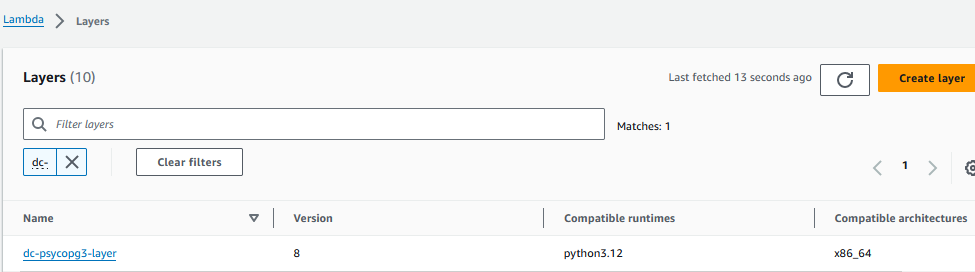
Confirm that the layer was published
From the AWS Management Console, navigate to the Lambda Layers page and confirm that the above layer is present.
Create a Lambda function
Create a new lambda function using Python 3.12

Add the layer previously uploaded to the function’s definition

Lambda function – sample code
Below is sample code that connects to a Redshift cluster and performs a select on a table
import logging
import psycopg
from psycopg import OperationalError
psycopg._encodings._py_codecs["UNICODE"] = "utf-8"
psycopg._encodings.py_codecs.update(
    (k.encode(), v) for k, v in psycopg._encodings._py_codecs.items()
)

logger = logging.getLogger()
logger.setLevel(logging.INFO)

def lambda_handler(event, context):

    print('**** Connecting to Redshift')
    my_hostname = 'my-cluster.us-east-1.redshift.amazonaws.com'
    my_database = 'my-databse'
    my_user     = 'my-database-user'
    my_password = 'my-db-user-password'
    my_port     =  5439

    connection_args = 'host={} port={} dbname={} user={} password={}'.format(
        my_hostname,
        my_port,
        my_database,
        my_user,
        my_password
    )

    try:
        logger.info("Establishing connection to Redshift")
        conn = psycopg.connect(connection_args)
        logger.info("SUCCESS: Connection to Redshift succeeded!")
    except psycopg.Error as e:
        logger.error("ERROR: Unexpected error: Could not connect to Redshift.")
        logger.error(e)


    sql_text = "select col_01, col_02 from my_schema.my_table where col_01 = 'dc-test'"
    print(sql_text)

    try:
        cur = conn.cursor()
        cur.execute(sql_text)
        for row in cur.fetchall():
            col_01 = row[0]
            col_02 = row[1]
            print(col_01, col_02)
        cur.close()
    except psycopg.Error as e:
        print('SQL failed. Failing text is ', sql_text)
        print(f"Error from database",e)
