SQL Server DDL Execution – displaying errors below each statement

When working with large SQL Server databases, DBAs often need to execute DDL scripts containing thousands of lines of code. While SQLCMD provides a straightforward way to execute these scripts, its error reporting can be deficient when troubleshooting failures in large scripts. Recently, I encountered this issue while executing a large DDL file. The standard SQLCMD output only showed generic errors like “Function ‘fn_xyz’ already exists with the same name” without providing context about which specific statement caused the error. The line number displayed usually refers to the line number in the DDL statement and not the line number in the context of the larger DDL file.

For effective troubleshooting, I needed to see the SQL (DDL) statement that was executed followed by the error. Having these elements together would allow me to quickly correlate errors with their corresponding SQL statements, significantly reducing debugging time. To fulfill this need, I wrote a Python solution that provides granular execution control and comprehensive output logging. This approach offers several advantages:

Individual statement execution
Paired output of SQL and results
Clear separation between statements

The python code and sample successful and unsuccessful results are below.

Python code

import pyodbc
import os
from datetime import datetime

def execute_sql_file(input_file, output_file, server, user, password):
    # Get password from environment variable for security
    connection_string = f'DRIVER={{SQL Server}};SERVER={server};DATABASE=master;UID={user};PWD={password}'
    
    try:
        # Establish connection
        conn = pyodbc.connect(connection_string)
        cursor = conn.cursor()
        
        current_batch = []
        
        with open(input_file, 'r') as infile, \
             open(output_file, 'w') as outfile:
            
            # Write header with timestamp
            outfile.write(f"SQL Execution Results - {datetime.now().strftime('%Y-%m-%d %H:%M:%S')}\n")
            outfile.write("-"*80 + "\n\n")
            
            for line in infile:
                # line = line.strip()
                line = line.rstrip('\n\r')  # removes both \n and \r
                
                # Skip empty lines
                # if not line:
                    # continue
                
                # If we hit a GO statement, execute the batch
                test_line = line
                if test_line.strip().lower() == 'go':
                    if current_batch:
                        sql_statement = '\n'.join(current_batch)
                        
                        # Write the input SQL to output file
                        outfile.write("Input SQL:\n")
                        outfile.write("-"*11 + "\n")
                        outfile.write(sql_statement + "\n\n")
                        
                        try:
                            # Execute the SQL batch
                            results = cursor.execute(sql_statement)
                            
                            # Write results header
                            outfile.write("Results:\n")
                            outfile.write("-"*8 + "\n")
                            
                            # Fetch and write column names if available
                            if cursor.description:
                                columns = [column[0] for column in cursor.description]
                                outfile.write(" | ".join(columns) + "\n")
                                outfile.write("-" * (len(" | ".join(columns))) + "\n")
                                
                                # Fetch and write results
                                for row in results:
                                    outfile.write(" | ".join(str(value) for value in row) + "\n")
                            
                            conn.commit()
                            
                        except pyodbc.Error as e:
                            # Seems to return error 'Protocol error in TDS stream' if the object exists
                            # so ignoring
                            if  e.args[0] == 'HY000' and 'Protocol error in TDS stream' in str(e):
                                outfile.write(f"Ignoring TDS Protocol error: {str(e)}\n")
                                outfile.write("Possibly caused by object already existing\n")
                                pass
                            else:
                                outfile.write(f"Error executing SQL: {str(e)}\n")
                                conn.rollback()
                            
                        outfile.write("\n" + "="*100 + "\n\n")
                        current_batch = []
                else:
                    current_batch.append(line)
                    
    except pyodbc.Error as e:
        print(f"Database connection error: {str(e)}")
    finally:
        if 'conn' in locals():
            conn.close()

def main():
    # Configuration
    input_file = "input.sql"
    output_file = "sql_results.txt"
    server = "my_server"
    user = "my_user"
    password = "my_password"
    
    execute_sql_file(input_file, output_file, server, user, password)
    print("SQL execution completed. Check output file for results.")

if __name__ == "__main__":
    main()

Successful execution

SQL Execution Results - 2025-01-29 20:02:42
--------------------------------------------------------------------------------

Input SQL:
-----------
USE [dcdb01]

Results:
--------

=====================================================================================

Input SQL:
-----------

use [dcdb01]

Results:
--------

=====================================================================================

Input SQL:
-----------
CREATE TABLE [dbo].[dc_test_01](
	[id_01] [bigint] NOT NULL,
	[data_01] [varchar](10) COLLATE SQL_Latin1_General_CP1_CI_AS NULL
 CONSTRAINT [id_01] PRIMARY KEY CLUSTERED 
(
	[id_01] ASC
) 
WITH (PAD_INDEX = OFF, STATISTICS_NORECOMPUTE = OFF, IGNORE_DUP_KEY = OFF, ALLOW_ROW_LOCKS = ON, ALLOW_PAGE_LOCKS = ON, OPTIMIZE_FOR_SEQUENTIAL_KEY = OFF) ON [PRIMARY]
) ON [PRIMARY] TEXTIMAGE_ON [PRIMARY]

Results:
--------

=====================================================================================

Input SQL:
-----------
CREATE TABLE [dbo].[dc_test_02](
	[id_02] [bigint] NOT NULL,
	[data_02] [varchar](10) COLLATE SQL_Latin1_General_CP1_CI_AS NULL
 CONSTRAINT [id_02] PRIMARY KEY CLUSTERED 
(
	[id_02] ASC
) 
WITH (PAD_INDEX = OFF, STATISTICS_NORECOMPUTE = OFF, IGNORE_DUP_KEY = OFF, ALLOW_ROW_LOCKS = ON, ALLOW_PAGE_LOCKS = ON, OPTIMIZE_FOR_SEQUENTIAL_KEY = OFF) ON [PRIMARY]
) ON [PRIMARY] TEXTIMAGE_ON [PRIMARY]

Results:
--------

=====================================================================================

Unsuccessful execution

SQL Execution Results - 2025-01-29 20:01:38
--------------------------------------------------------------------------------

Input SQL:
-----------
USE [dcdb01]

Results:
--------

=====================================================================================

Input SQL:
-----------

use [dcdb01]

Results:
--------

=====================================================================================

Input SQL:
-----------
CREATE TABLE [dbo].[dc_test_01](
	[id_01] [bigint] NOT NULL,
	[data_01] [varchar](10) COLLATE SQL_Latin1_General_CP1_CI_AS NULL
 CONSTRAINT [id_01] PRIMARY KEY CLUSTERED 
(
	[id_01] ASC
) 
WITH (PAD_INDEX = OFF, STATISTICS_NORECOMPUTE = OFF, IGNORE_DUP_KEY = OFF, ALLOW_ROW_LOCKS = ON, ALLOW_PAGE_LOCKS = ON, OPTIMIZE_FOR_SEQUENTIAL_KEY = OFF) ON [PRIMARY]
) ON [PRIMARY] TEXTIMAGE_ON [PRIMARY]

Ignoring TDS Protocol error: ('HY000', '[HY000] [Microsoft][ODBC SQL Server Driver]Protocol error in TDS stream (0) (SQLExecDirectW)')
Possibly caused by object already existing

=====================================================================================
Input SQL:
-----------
CREATE TABLE [dbo].[dc_test_02](
	[id_02] [bigint] NOT NULL,
	[data_02] [varchar](10) COLLATE SQL_Latin1_General_CP1_CI_AS NULL
 CONSTRAINT [id_02] PRIMARY KEY CLUSTERED 
(
	[id_02] ASC
) 
WITH (PAD_INDEX = OFF, STATISTICS_NORECOMPUTE = OFF, IGNORE_DUP_KEY = OFF, ALLOW_ROW_LOCKS = ON, ALLOW_PAGE_LOCKS = ON, OPTIMIZE_FOR_SEQUENTIAL_KEY = OFF) ON [PRIMARY]
) ON [PRIMARY] TEXTIMAGE_ON [PRIMARY]

Ignoring TDS Protocol error: ('HY000', '[HY000] [Microsoft][ODBC SQL Server Driver]Protocol error in TDS stream (0) (SQLExecDirectW)')
Possibly caused by object already existing

=====================================================================================
National Museum of World War II Aviation’s Corsair flight

Hearing first-hand the roar of the Pratt and Whitney engine and seeing the legendary Corsair take off, was a once-in-a-lifetime experience for me! Many thanks to the National Museum of World War II Aviation for putting on such an awesome demonstration this past weekend. It was amazing seeing history in flight!

Sit back and relax, the videos are on their way! Just give them a sec to load—they’re best enjoyed in full screen! 🎬✨

Engine start

Taxi

Engine shutdown and wings folding

For those interested in the details of this magnificent aircraft, check out this link: Brewster F3A Corsair.

If you are ever in Colorado Springs, Colorado, spend a few hours at the museum National Museum of World War II Aviation.

Redshift – Using IAM authentication to generate database user credentials

An alternative to defining a user with a password in the database is to use IAM authentication to generate a temporary “password” that is valid for a predefined time. This process is defined in this blog post. All the commands were executed on an AWS EC2 Linux server using PSQL.

Create a user without a password
Connect to the database as a super user and create a user with the below SQL statement:

create user temp_creds_user password disable;

If the user currently exists in the database with a password and you want to change to IAM authentication, alter the user with the below SQL statement:

alter user temp_creds_user password disable;

Access to get credentials
In order to get the temporary credentials, we need to call get-cluster-credentials which requires redshift:GetClusterCredentials access. This is documented at this link.

Generate the temporary credentials
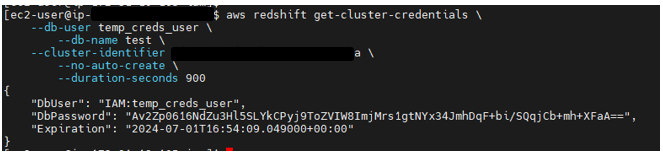
Generate temporary credentials with the below command:

aws redshift get-cluster-credentials \
    --db-user temp_creds_user \
    --db-name  \
    --cluster-identifier  \
    --no-auto-create \
    --duration-seconds 900

The above command will generate output similar to:

Connect to the database
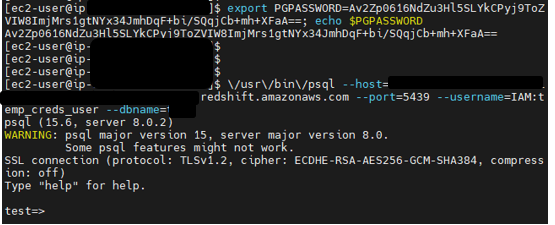
Connect to the database with the below command. Note that the name of the database user has been prefixed with “IAM:”

\/usr/\/bin\/psql --host= --port=5439 --username=IAM:temp_creds_user --dbname=

The above command will generate output similar to:

Debugging PostgreSQL Stored Procedures in Amazon RDS: A Workaround

Debugging stored procedures in Amazon RDS for PostgreSQL might pose a challenge if you are accustomed to using a GUI tool. The absence of support for the pldbgapi extension in Amazon RDS for PostgreSQL complicates this process. In this blog post, I suggest a workaround based on deploying an additional PostgreSQL on an Amazon Windows EC2 instance as a debugging platform.

Assuming that you used AWS Schema Conversion Tool (SCT) with the Oracle extension pack, the code converted from Oracle to PostgreSQL will contain several calls to objects in schemas named aws_operators, aws_oracle_context, aws_oracle_data, and aws_oracle_ext. These modules emulate functions present in Oracle that are required for the code to execute in PostgreSQL. However, after the conversion by AWS SCT, you may still need to debug a stored procedure to resolve an issue.

The first step is to get the DDL for the objects created as part of the extension pack. The process is as follows:

– Start the AWS SCT tool,
– connect to the target database,
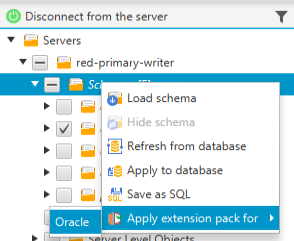
– right click on the target schema in the right-hand box,
– click on the “Apply Extension Pack for” Oracle in this case


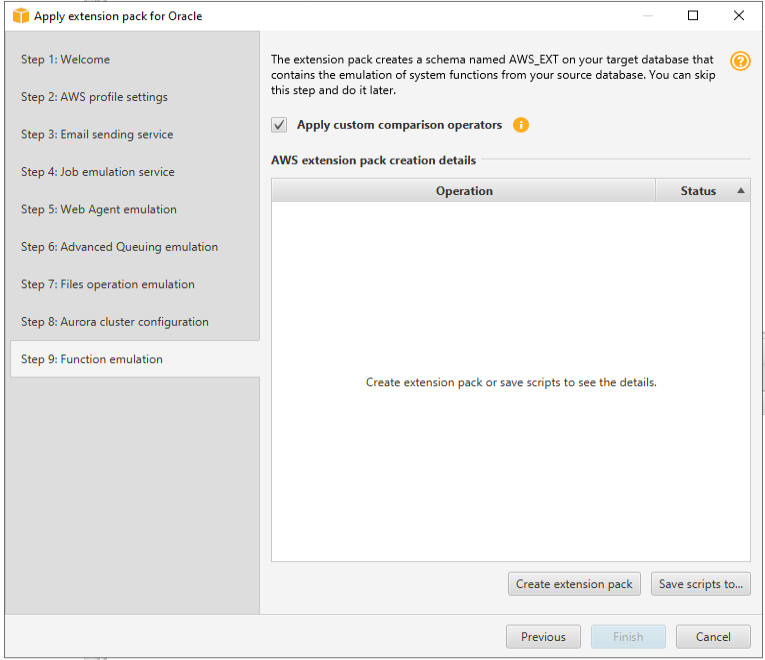
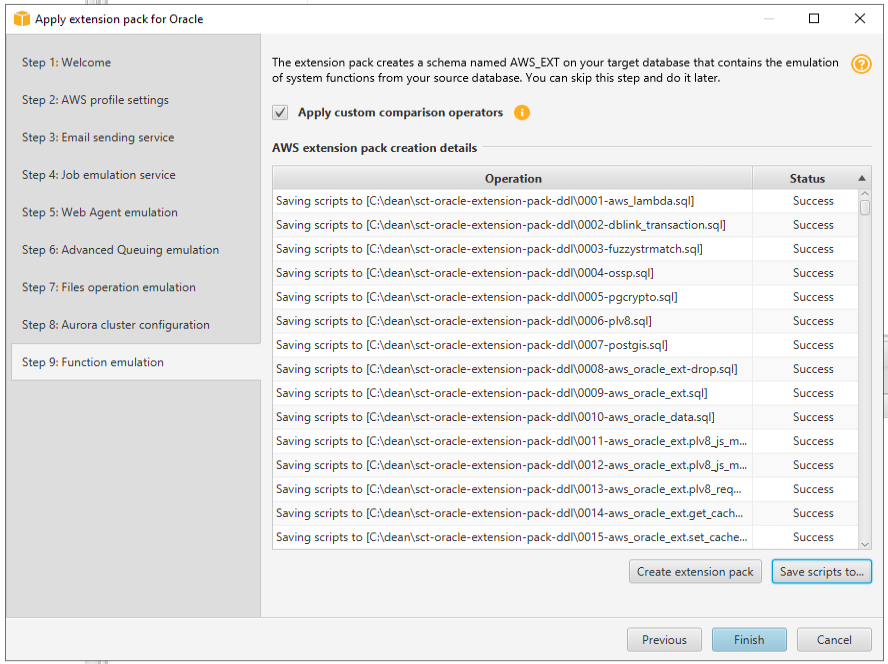
In the “Apply extension pack for Oracle” dialogue box, progress to “Step 9: Function emulation” and click on the “Save scripts to” button on the bottom right.

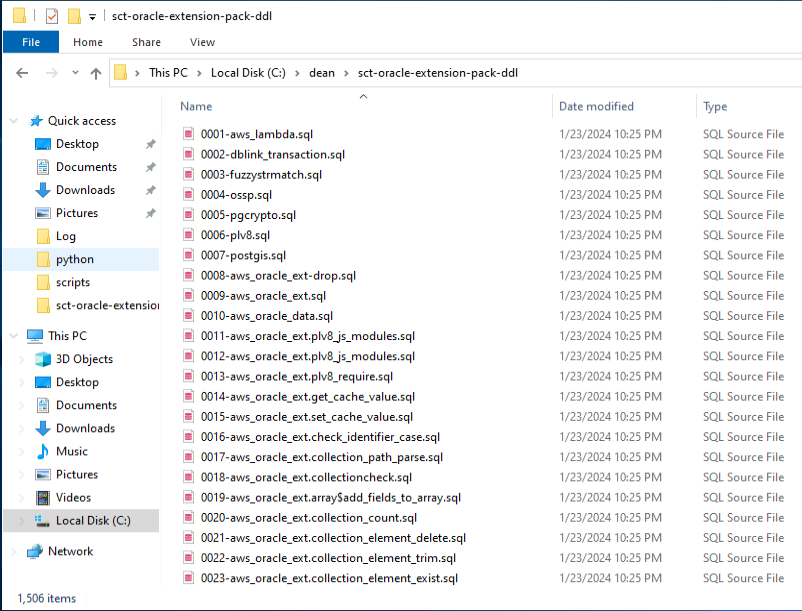
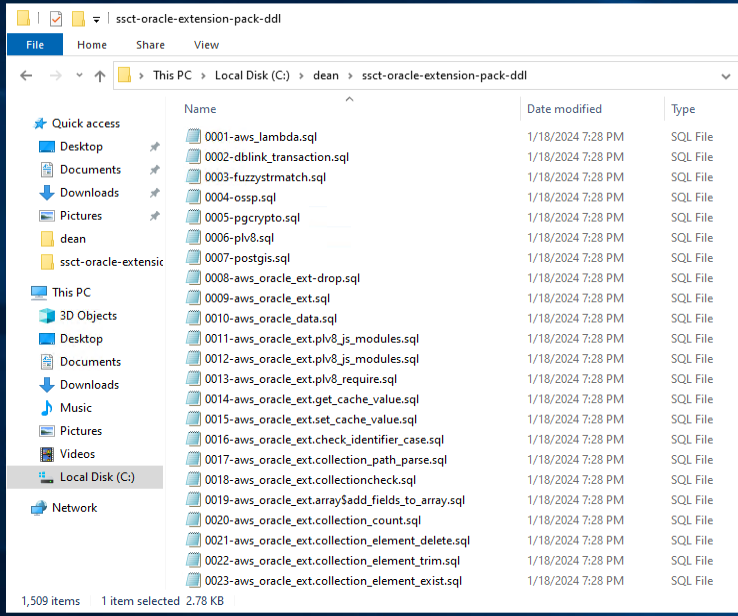
Provide the name of a folder (preferably a new empty folder) as the target for the SQL files. The DDL files will be created as shown below


As of January 2024, this process will create 1506 files. This is subject to change as AWS releases newer versions of SCT.

The next step is to deploy an Amazon EC2 Windows instance. After the instance has been created, connect to the instance and download the PostgreSQL software from EnterpriseDB (EDB). I chose the EDB distribution as it includes several extensions preinstalled including pldbgapi.

The PostgreSQLTutorial website provides the steps to be followed to install PostgreSQL. After PostgreSQL has been installed, create a new database for this test. In this new database, create the pldbgapi extension with the SQL command

CREATE EXTENSION IF NOT EXISTS pldbgapi;

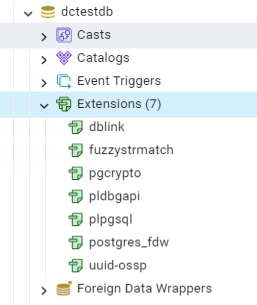
Confirm that the extension has been created. I am using PGAdmin to connect to my Amazon RDS PostgreSQL instance


After the extension has been created, copy the DDL files created from SCT to a location on the Windows server

(There are 1,509 files shown above as I created three extra files. Please ignore them.)

After some testing, I identified that the best way to deploy them was via Windows batch file with commands as shown below

@echo off
setlocal
set PGPASSWORD=password-goes-here
"C:\Program Files\PostgreSQL\15\bin\psql.exe" -h localhost -U postgres -d dctestdb -f "C:/dean/ssct-oracle-extension-pack-ddl/0001-aws_lambda.sql" -L "C:/dean/ssct-oracle-extension-pack-ddl/sct-ddl.log"
"C:\Program Files\PostgreSQL\15\bin\psql.exe" -h localhost -U postgres -d dctestdb -f "C:/dean/ssct-oracle-extension-pack-ddl/0002-dblink_transaction.sql" -L "C:/dean/ssct-oracle-extension-pack-ddl/sct-ddl.log"
.
.
.
All other files here
.
.
.

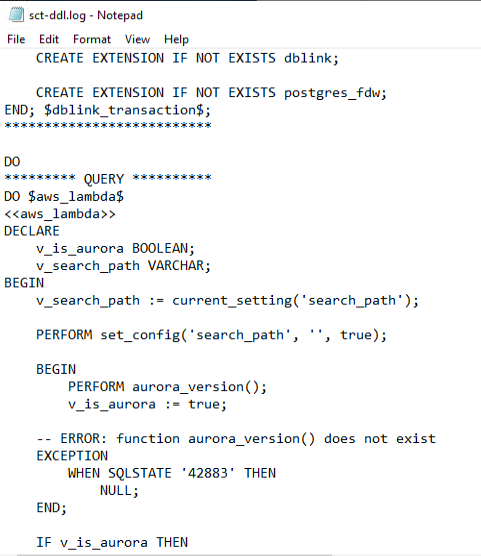
The output of the DDL operations will be in the log file specified in the above batch file


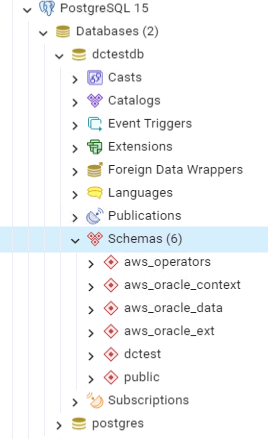
After the DDL files have been executed, the database has the aws_operators, aws_oracle_context, aws_oracle_data, and aws_oracle_ext schemas defined


At this point, you can extract the DDL for a stored procedure (and related objects) from Amazon RDS and create it in the Windows EC2 PostgreSQL database and you will be able to debug the stored procedure via the GUI.

Completed CompTIA CertMaster CE for my Security+ certification

Maintaining IT certifications can be a time-consuming commitment, often involving retesting and juggling busy schedules. This time I decided to try CompTIA’s CertMaster Continuing Education (CE) for Security+ to extend my certification.

This self-paced e-learning program proved to be an efficient and engaging avenue to refresh and expand my existing knowledge base. Instead of cramming for a one-off test, I had the flexibility to delve deeper into key security concepts, revisiting essential skills and acquiring new ones. While working at my own pace, I was able to maintain my certification while enhancing my skill set and staying ahead of the curve in the ever-changing world of cybersecurity.

Testing online COBOL environments

I often use web-based environments, to test the syntax of particular statements in programing languages. As a fun challenge, I decided to see if I could find a web-based environment to test COBOL code. I was expecting this to be an impossible quest because; “why would you?” 😊

After trying a couple of sites, I landed on tutorials point’s web site:
Tutorialspoint online COBOL compiler

Using this website, I was able to write a simple COBOL program to reverse a string. Some of the key concepts used are
a. PERFORM VARYING
b. One dimensional table
c. Reference modification, aka COBOL speak for substring

Below is a screen shot of the web interface. The source code is displayed in the left panel. When you press the execute button, the right panel is a terminal that accepts input and displays output.

Occasionally the web interface displays its true unix/php identity with a message such as:

This can be remediated by putting the string in quotes as shown below:

The complete source code in text is below:

IDENTIFICATION DIVISION.
PROGRAM-ID. REVERSESTRING.

DATA DIVISION.

WORKING-STORAGE SECTION.
01  GENERAL-VARIABLES.
    05  WS-ORIGINAL-TXT           PIC X(100).
    05  WS-REVERSE-TXT-TABLE.
        10  WS-REVERSE-TXT-ITEM   PIC X(1) OCCURS 100 TIMES.
    05  WS-I                      PIC S9(3)  USAGE IS COMP-3 VALUE 0.
    05  WS-J                      PIC S9(3)  USAGE IS COMP-3 VALUE 0.
    05  WS-TEMP                   PIC X(01).
    05  WS-ORIG-TXT-LEN           PIC S9(3)  USAGE IS COMP-3.

PROCEDURE DIVISION.
    DISPLAY "Enter a string to reverse: "
    ACCEPT WS-ORIGINAL-TXT

    PERFORM VARYING WS-I FROM 100 BY -1 UNTIL ( WS-I = 1 OR WS-TEMP <> ' ')
            MOVE WS-ORIGINAL-TXT(WS-I:1) TO WS-TEMP
    END-PERFORM
    COMPUTE  WS-ORIG-TXT-LEN = WS-I + 1
    DISPLAY "You entered    : " WS-ORIGINAL-TXT(1:WS-ORIG-TXT-LEN)

    PERFORM VARYING WS-I FROM WS-ORIG-TXT-LEN BY -1 UNTIL (WS-I = 0)
            COMPUTE WS-J = WS-J + 1
            MOVE WS-ORIGINAL-TXT(WS-I:1) TO  WS-REVERSE-TXT-ITEM(WS-J)
    END-PERFORM
    
    DISPLAY "Reverse string : " WS-REVERSE-TXT-TABLE
    
    STOP RUN.

Automating website scraping

For many years I have had a personal quest to develop a simple way to automate the collection of information from websites. In 2017, I played around with a Python/Selenium-based solution. See blog post Python/Selenium example for details.

While the Python/Selenium-based solution was interesting it did not meet all my requirements such as ease of use, low development time, and flexibility. While browsing the web I ran across Windows Power Automate which looked interesting. I was pleasantly surprised to see that a desktop version of the software was included in my Microsoft 365 subscription. I downloaded and installed the product and attempted to automate the collection of information.

The use case was to get the account balance from my brokerage account, the current DOW and S&P numbers, and write the information to a CSV file with the current date. The steps are as follows:

01. Click on create a new flow (aka program unit)
02. Set up variables for user names and passwords by clicking on “Variables” on the left and dragging the function “Set variable” into the body of the flow
03. Launch a new web browser instance with “Launch new name-of-browser”. I was not able to get the Firefox plugins to work, however, Microsoft Edge worked well
04. Populate the user name and password with “Populate text field on web page”. The product displays a UI when you are on the web page so you simply have to highlight the field on the web page and assign the variable set in 02. above
05. Usually you have to click on a login button of some sort. This is accomplished with the “Press button on web page” function
06. I coded a “Wait” for 30 seconds to let the web page complete the log on
07. Use the “Extract data from web page” to scrape the required data and store it into a variable
08. The “Get current date and time” function retrieves the current date into a variable
09. Write the data into a file with the “Write text to file” function
10. Close the web browser with the “Close web browser” function

Repeat the above steps for each web page you need to extract the information from. The individual functions can be moved up or down in the flow and can be copied to repeat a function.

One issue I ran into was that the is written to a file in columnar format. I am sure that I will be able to change this as I get more familiar with the product. In the interim, I created a few lines of code in Python and executed it from the flow with the “Run DOS command function” to format the data into a CSV file. Now when I want the information from these three websites, I run the flow and open the CSV file in Excel.

The tool also has options to debug such as run from a step or stop at a step. The product is intuitive and easy to learn for anyone with a few basic coding skills.

Complete documentation is here.

Pro*C – PCC-F-02104, Unable to connect to Oracle

If you are attempting to compile Pro*C code and get the error “PCC-F-02104, Unable to connect to Oracle”, perform the following steps:

Instead of connecting to the Oracle database as

sqlplus userid/password@somelistener.domain.com:1521/MYPRODDB

and then attempting to compile, edit your tnsnames.ora to add the below entry (change appropriately to reflect your database SID or service, listener, port etc.)

MY_DB =
  (DESCRIPTION =
    (ADDRESS = (PROTOCOL = TCP)(HOST = SOMELISTENER.DOMAIN.COM)(PORT = 1521))
    (CONNECT_DATA =
      (SERVER = DEDICATED)
      (SID = MYPRODDB)
    )
  )

Export this entry as follows

export TWO_TASK=MY_DB

And now connect as

sqlplus userid/password

i.e. without specifying the usual connect string.

In case you are wondering about the name “TWO_TASK”, Tom Kyte explains it best:
“because in days gone by – the 1980’s – two tasks (having two tasks working together) just made ‘sense’”.

142
51
73
77